Quarto
Rendering documents and websites
April 1, 2026
Quarto
What is Quarto
Quarto is “an open-source scientific and thechnical publishing system”.
Allows you to
write a document containing both:
- code
- markdown
render these documents into a variety of output formats.
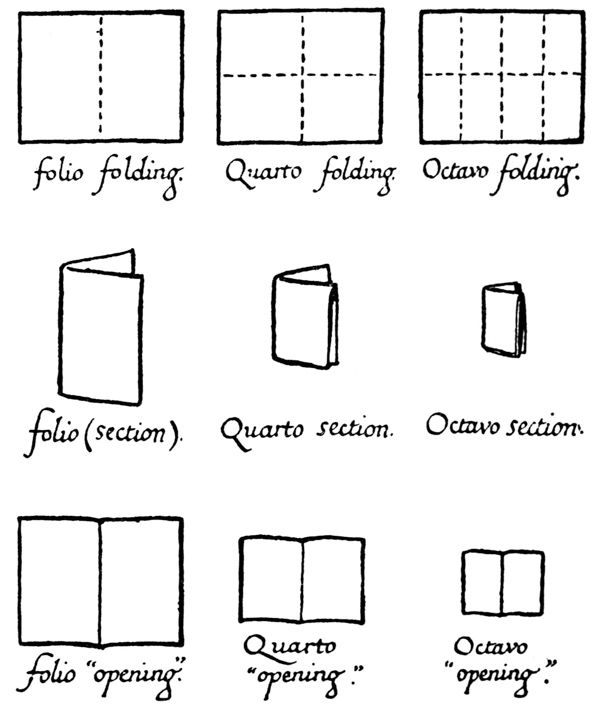
Quarto Name
Where does the name come from?
Quarto Output
Some of the output formats Quarto can render to include:
- HTML documents
- presentations (both PDFs and HTML)
- websites
- dashboards
- Microsoft Word and PPT
How Quarto Works

Quarto vs. Rmarkdown
If you are familar with R, you have likely heard of the Rmarkdown package.
Rmarkdown allows writing R code + markdown in the same file, and compiling documents.
Quarto is the successor to Rmarkdown.
- Works with multiple programming languages
- More standardized across output formats
- Cleaner syntax
- Fixes some weird/glitchy behavior
Outline
Today we will cover:
- Rendering a single Quarto document
- Rendering multiple Quarto documents (project)
- Rendering a website with Quarto
Next class, we will cover:
- Including code (R, Python, Julia) in your Quarto documents
- Creating presentations with Quarto
Render a Document
Quarto Pieces
Each Quarto Document (file extension “.qmd”) has two sections:
- a header (YAML)
- a body / content
Quarto Header (YAML)
The header of a Quarto document is written in YAML (yet another markup language).
It controls the settings for this document.
YAML Syntax
YAML is a markup language that uses indentation to declare nested settings.
- Space sensitive: indentation determines how settings are interpreted
- Uses
:to declare settings - Uses
-to declare items in a list
Example:
Quarto Body / Content
Quarto uses markdown for text content.
Writing Math Equations
Since Quarto uses markdown, you can write math equations using LaTeX syntax.
- Inline math between two dollar signs:
$ $
Rendering \sum_{i=0}^{\infty}x^i as inline math: \(\sum_{i=0}^{\infty}x^i\).
- display math with
$$ $$to make a block of math:
\[ \sum_{i=0}^{\infty}x^i \\ \max_{a} \int_0^1 U(a) \]
Live Coding Example
- Render a basic Quarto document
- to HTML
- Add some markdown
- Add some math
Changing Output Formats
Output to PDF example
Change the format: yaml setting to “pdf”.
Output to PDF steps
Quarto will
- convert your markdown into LaTeX
- run the code cells
- compile the LaTeX + code output into a PDF
You will need to first have LaTeX installed on your computer.
If you don’t, after installing quarto, run quarto install tinytex in the terminal (PDF Engines Doc).
Output to Microsoft Word
Output to Typst (pdf)
Typst Overview
Typst is a new typesetting system that is an alternative to LaTeX.
- Quarto can render to Typst, which then compiles to PDF
Typst is:
- faster than LaTeX
- has a more modern syntax
- in early stages of development
IMO: Typst is trying to be in between mardown and LaTeX.
Output to Multiple Formats
Sometimes you may want an html page and a PDF:
Live Coding Example
- Show Rendering to
- Microsoft Word
- Typst
- Multiple formats
Projects
Quarto projects
Projects are useful when working
- multiple Quarto documents
- that depend or interact with one another
Creating a Quarto Project
Quarto has a some project types and templates that you can choose from:
In VS Code, you can also create a Quarto project from the Command Palette.
Project Settings
_quarto.yml is a YAML file of settings.
Declares this folder as a Quarto Project.
- Allows you to set project-wide settings
- Can set header settings for all documents in the project
_quarto.yml example
Here is an example _quarto.yml file for a project:
Project Wide Setting
Some of the project level settings affect how Quarto behaves, but not the documents themselves.
For instance, I could include in my project yaml:
This causes Quarto to re-render documents every time I save any changes.
Project Wide Header
Other project level settings affect the behavior of the documents in the project.
For instance, I could include in my project yaml:
This would apply the “styles.css” stylesheet to all documents in the project that are rendered to HTML.
I could overwrite this style by specifying a different stylesheet in the document yaml header.
Websites
Quarto Website
A Quarto website is a specifc type of Quarto project.
It consists of:
- a collection of Quarto documents that are all rendered to HTML.
- plus a
_quarto.ymlto control website settings
Quarto builds your website using Bootstrap and a bunch of default theming options.
Example website: _quarto.yml
Here’s an example website project yaml, with a navbar and a theme.
Example Website: “index.qmd”
Here is a simple home page for the website.
Example Website: “about.qmd”
If we want to add a link to another page in our document, we can reference the quarto file.
Website Structure
The structure of this Quarto website project looks like this:
my-quarto-website/
├── _quarto.yml
├── index.qmd
├── about.qmd
├── styles.css
├── docs/
    ├── index.html
    ├── about.html
We only ever edit the .qmd files and the _quarto.yml file.
Quarto creates everything in the docs/ folder when we render the website.
Render Process
Quarto…
- takes the collection of
.qmdfiles in the project, - combines them with the
_quarto.ymlsettings, - renders them to HTML,
- shows a preview of the website.
Benefits of using Quarto for Websites
- Much easier to write markdown and yaml settings than raw HTML and CSS
- Can include code and code ouptut directly (will see next class)
- Take advantage of Quarto’s built in theming and styling options
- If you already use Quarto for documents, it’s easier than learnking Jekyll or Hugo for websites
Show Quarto Documentation
Live Coding Example
Create a Quarto project (a website)
Edit and render the website
Look at the quarto-academic-website template