Unit Tests & GitHub Actions
Testing code systematically and automatically
April 13, 2026
Unit Tests
What is a unit test?
Unit tests…
- take a unit (small piece) of code,
- run it,
- and test if the result matches what is expected.
Unit tests are a programming methodology/framework where each test runs on the smallest possible portion of the code, so the errors tell you exactly where something went wrong.
Why unit tests?
Remember back to the start of the course, we motivated writing programming scripts as a replacement for point-and-click software?
Unit tests take this one step farther.
- When you merge two data.frames, you print them out to make sure the merge worked
- Instead, you could write a unit test that expects a data.frame of a certain size (or maybe no
NAvalues)
Unit Tests Formalize Current Habits
I want to emphasize this,
- you already test your code all the time;
- you just do it on the fly.
When you find yourself testing for the 3rd time by hand if one of you merges worked, you should consider writing a unit test for it instead.
Unit Tests for Packages
Unit tests are most often used for packages.
- Each function you write should have at least one unit test.
- verify the function gives the correct result for a few simple cases
- make sure it gives errors on likely mispecified arguments
- etc.
Unit Tests for Research Projects
But I think unit tests are incredibly useful for research projects as well:
- Test if your data has missing observations
- Test if your regression results are within a certain range
- Test if your output plots are non-empty
- etc.
You can then easily rerun all of your tests whenever you update your raw data, or change a step in the analysis.
Unit Tests: testthat package
Install testthat
In R, the best package for unit tests is testthat.
And then
Notice that we set the “edition” of the package after loading it. This is because so many packages relied upon testthat edition 2 they couldn’t deprecate all the functions they wanted to change, so they made an edition 3 (which is what we will use).
Expecting Results
The basic element of testthat unit tests are the expect_ family of functions.
Which didn’t return anything. It only returns something on an error.
And this is the goal of unit tests, throw a helpful error when the result isn’t expected.
Expecting TRUE/FALSE
A couple of very useful expectations are
These work with logical conditions, which make it easy to write your own expectations.
When you do this the error messages are less helpful, so it’s better to use a pre-built expect_() function if you can.
Expecting Identical
If you want to check if two numbers are equal, you can use,
If you want to check if two numbers are exactly equal, you use
Expecting Types
It can be useful to expect a certain data type.
Error:
! Expected "hello" to have type "double".
Actual type: "character"Expecting Warnings and Errors
Sometimes you will want to expect an error.
Testing Our Own Function
Let’s write a very basic function and some tests for it.
And some things we could test:
We’d expect an error when given vectors of different length, but R tries to fix this for us and duplicates values to make them the same length and just throws a warning.
Making a Unit Test
We now have a group of expectations we would like to run for our function.
Let’s make our first “unit” test.
Test passed with 3 successes 🎊.And we passed!
- First Argument: “string” with a name for the test
- Second Argument: {code} block with one or more
expect_()functions
Making a Unit Test that Fails
Let’s go ahead and add our expectation that failed.
── Warning: rmse works for various vectors ─────────────────────────────────────
longer object length is not a multiple of shorter object length
Backtrace:
▆
1. ├─testthat::expect_error(rmse(c(1, 2), c(1, 2, 3)))
2. │ └─testthat:::quasi_capture(...)
3. │ ├─testthat (local) .capture(...)
4. │ │ └─base::withCallingHandlers(...)
5. │ └─rlang::eval_bare(quo_get_expr(.quo), quo_get_env(.quo))
6. └─global rmse(c(1, 2), c(1, 2, 3))
7. └─base::mean((actual - predicted)^2)
── Failure: rmse works for various vectors ─────────────────────────────────────
Expected `rmse(c(1, 2), c(1, 2, 3))` to throw a error.Error:
! Test failed with 1 failure and 3 successes.Fixing Our Function
Let’s fix our rmse() function to throw an error for mismatched vectors.
Now we can rerun our test.
🎉
testthat Overview
We have seen how to write individual unit tests using testthat package.
- Each unit test consists of one or more
expect_()functions
Now we will look at two ways to store and run all of our unit tests.
Unit Tests in a Project
Setting up Unit Tests for a Project
We will setup unit tests with the testthat package.
Add a folder called
tests/to the project.Add your testing files in there (i.e.
./tests/test-rmse.R)
We also need to have saved our rmse() function somewhere.
- For now, let’s just put it in
code/rmse.R
Diagram of Project Structure
Project Setup
tests/test-rmse.R
test_that("rmse works for various vectors", {
expect_equal(rmse(c(1,2,3), c(2,2,2)), 0.816, tolerance = 0.01)
expect_equal(rmse(c(0,0,0), c(10,10,10)), 10)
expect_true(is.na(rmse(c(1,2,NA), c(1,2,3))))
expect_error(rmse(c(1,2), c(1,2,3)))
})
test_that("rmse works for a fitted model", {
m <- lm(Petal.Length ~ Petal.Width, data = iris)
fit <- fitted(m)
act <- iris$Petal.Length
x <- rmse(fit, act)
expect_type(x, "numeric")
expect_lt(x, 0.5) ## Expect "less than"
})Running our Tests
We can run our tests with:
✔ | F W  S  OK | Context
✖ | 2        0 | rmse
────────────────────────────────────────────────────────────────────────────────────
Error (test-rmse.r:2:3): rmse works for various vectors
Error in `rmse(c(1, 2, 3), c(2, 2, 2))`: could not find function "rmse"
Backtrace:
    ▆
 1. └─testthat::expect_equal(rmse(c(1, 2, 3), c(2, 2, 2)), 0.816, tolerance = 0.01) at test-rmse.r:2:3
 2.   └─testthat::quasi_label(enquo(object), label, arg = "object") at testthat/R/expect-equality.R:62:3
 3.     └─rlang::eval_bare(expr, quo_get_env(quo)) at testthat/R/quasi-label.R:45:3

Error (test-rmse.r:13:3): rmse works for a fitted model
Error in `rmse(fit, act)`: could not find function "rmse"
────────────────────────────────────────────────────────────────────────────────────

══ Results ═════════════════════════════════════════════════════════════════════════
── Failed tests ────────────────────────────────────────────────────────────────────
Error (test-rmse.r:2:3): rmse works for various vectors
Error in `rmse(c(1, 2, 3), c(2, 2, 2))`: could not find function "rmse"
Backtrace:
    ▆
 1. └─testthat::expect_equal(rmse(c(1, 2, 3), c(2, 2, 2)), 0.816, tolerance = 0.01) at test-rmse.r:2:3
 2.   └─testthat::quasi_label(enquo(object), label, arg = "object") at testthat/R/expect-equality.R:62:3
 3.     └─rlang::eval_bare(expr, quo_get_env(quo)) at testthat/R/quasi-label.R:45:3

Error (test-rmse.r:13:3): rmse works for a fitted model
Error in `rmse(fit, act)`: could not find function "rmse"

[ FAIL 2 | WARN 0 | SKIP 0 | PASS 0 ]
Error: Test failures
Sourcing Our Function First
We got a failueres because we need to load our custom function first.
✔ | F W  S  OK | Context
✔ |          6 | rmse

══ Results ═════════════════════════════════════════════════════════════════════════
[ FAIL 0 | WARN 0 | SKIP 0 | PASS 6 ]
And then we pass all of our tests!
Sourcing Our Function in Our Tests
In this setup, I would consider sourcing the rmse() function in our testing file.
We have to go up one folder because tests are run in the “tests” folder, so the relative path to the code folder requires the “..” to go up a folder first.
Now Running Project Tests
Now that the our unit test sources the rmse() function itself, we can run:
✔ | F W  S  OK | Context
✔ |          6 | rmse

══ Results ═════════════════════════════════════════════════════════════════════════
[ FAIL 0 | WARN 0 | SKIP 0 | PASS 6 ]
I think for a project this is good.
- Each test file is self-sufficient
- Lets you run tests from the terminal or anytime during the project
- But sometimes your tests will rely on the rest of your code running first
Testing Your Analysis
I think a good general form for a “main.R” script is:
main.r
# Restore renv environment (should happen automatically)
renv::restore()

## Data Cleaning
source("code/clean-data.r")
source("code/transform-data.r")

## Analysis
source("code/run-regressions.r")

## Figures & Tables
source("code/figures/make-scatter-plot.r")
source("code/tables/make-summ-table.r")
source("code/tables/make-reg-table.r")

## Run Tests
testthat::test_dir("tests")
Tests in a Package
Unit tests are well supported in R package development.
- Construct them using
usethis::use_test("testname") - run them with
devtools::check()ordevtools::test() - writing useful tests makes certain your functions behave as intended
See R Packages (2e): Testing Basics for more details.
Data Validation and Tests
validate package
  name items passes fails nNA error warning           expression
1   V1    32     32     0   0 FALSE   FALSE    mpg - 0 >= -1e-08
2   V2    32     32     0   0 FALSE   FALSE    cyl - 0 >= -1e-08
3   V3    32     26     6   0 FALSE   FALSE         mpg/wt <= 10
4   V4     1      0     1   0 FALSE   FALSE cor(mpg, cyl) >= 0.2
Validation in a Unit Test
test_that("Raw survey data conforms to domain rules", {

  rules <- validator(
    mpg >= 0,
    cyl >= 0,
    mpg/wt <= 10,
    cor(mpg, cyl) >= 0.2
  )

  evaluation <- confront(mtcars, rules)
  eval_summary <- summary(evaluation)
  total_failures <- sum(eval_summary$fails)

  expect_equal(
    total_failures,
    0,
    info = {paste("Data validation failed! Check rules:",
                 paste(eval_summary$name[eval_summary$fails > 0], collapse = ", "), "\n",
                 paste(capture.output(print(eval_summary)), collapse = "\n")
                 )}
  )
})
Validation in a Unit Test
── Failure: Raw survey data conforms to domain rules ───────────────────────────
Expected `total_failures` to equal 0.
Differences:
1/1 mismatches
[1] 7 - 0 == 7
Data validation failed! Check rules: V3, V4
   name items passes fails nNA error warning           expression
1   V1    32     32     0   0 FALSE   FALSE    mpg - 0 >= -1e-08
2   V2    32     32     0   0 FALSE   FALSE    cyl - 0 >= -1e-08
3   V3    32     26     6   0 FALSE   FALSE         mpg/wt <= 10
4   V4     1      0     1   0 FALSE   FALSE cor(mpg, cyl) >= 0.2
Error:
! Test failed with 1 failure and 0 successes.Github Actions
Github Actions
Automate, customize, and execute your software development workflows right in your repository with GitHub Actions. You can discover, create, and share actions to perform any job you’d like, including CI/CD, and combine actions in a completely customized workflow. - Github Action documentation
Github Actions in summary
Allow you to execute code on a remote server hosted by Github.
- Can be configured to execute on certain events (i.e. whenever you push to Github)
- Can execute code in your project
- Or can execute prebuilt “actions” from Github or other parties
- The servers can run Linux, Windows, or MacOS
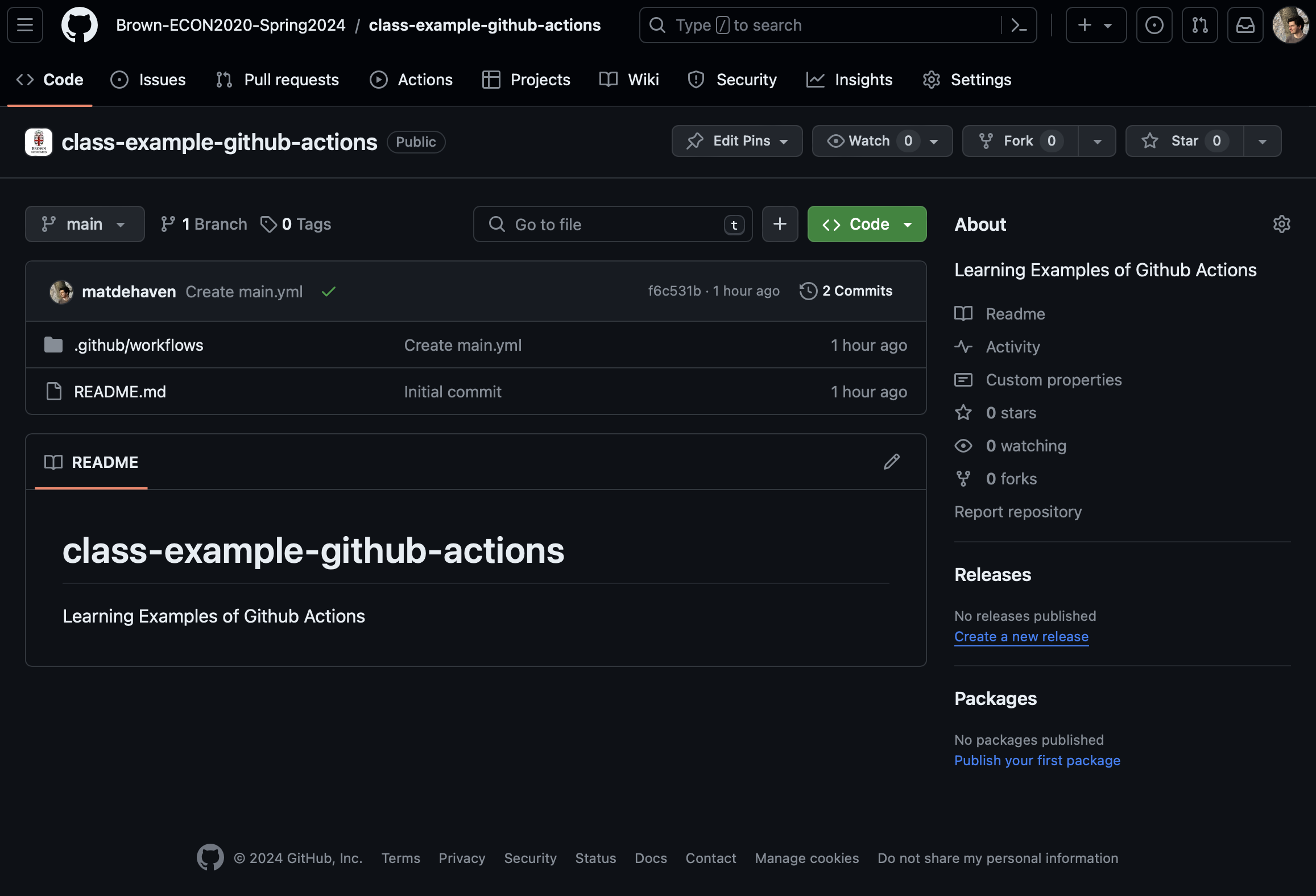
Github Actions Tab
There is a tab for Github Actions for every repository.
Github Actions Billing
You are running code on someone else’s server, so there is a limit to how much you can run. Github Action Billing.
But, Github Actions are free for public repositories.
And, you should have 2,000 minutes of run time for private repositories for a free account.
- You will have more if you sign up for the free Student Developer Pack.
So practically, you can run most things without a worry.
Github Action Compute Power
By default, Github Actions will run on a server with
- 3-4 CPU cores
- 16 GB memory
- 16 GB hard drive storage
Which is to say, these server resources are not super big.
But they also should be big enough to run most projects.
Upgrading Github Action Compute
You can upgrade to Github Actions running on servers that allocate more resources to you.
Up to :
- 64 CPU cores
- 256 GB memory
- 2 TB hard drive
But this will start costing actual money to do (Github Larger Runners). You should probably be looking at running your code on Brown’s HPC if you need something close to this size.
Github Actions Overview
Github Actions is a service that allows you to run workflows.
A Workflow Diagram:
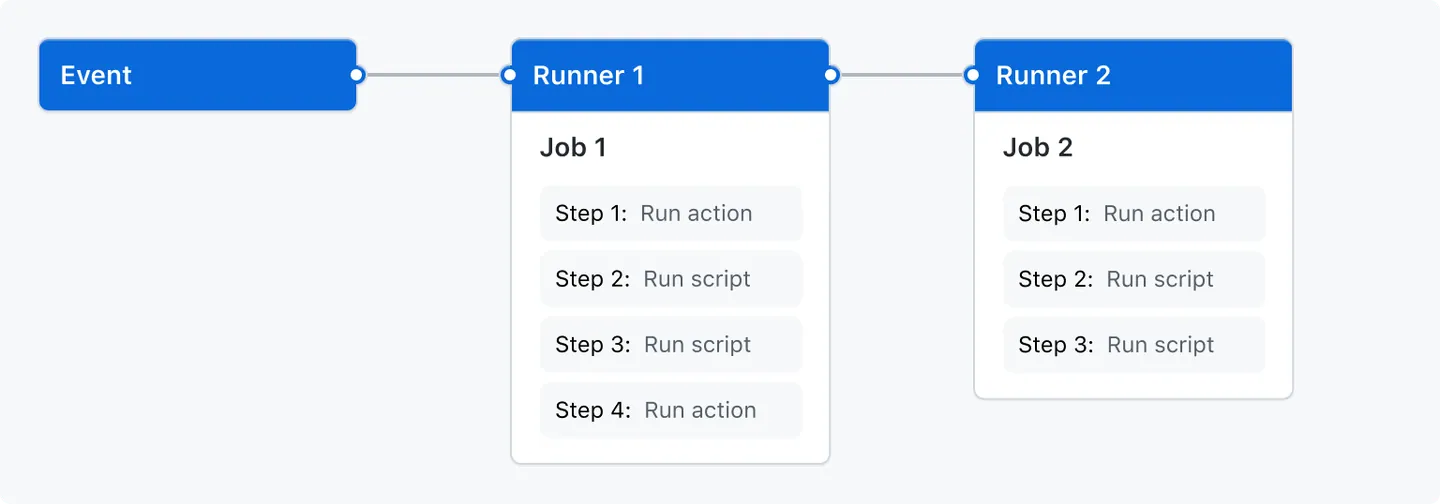
from the Github Actions documentation
Events
Events are what trigger a workflow to run.
Could be a Git event
- push to Github
- pull request, etc.
Can be triggered manually
Or set to run at specified time intervals (i.e. once a day)
Runners
A runner is a server—hosted by Github—that will run your jobs.
There is always one runner for each job.
They are virtual machines that can have Ubuntu Linux, Microsoft Windows, or macOS operating systems.
They default to a small amount of computing power, but can be upgraded.
Jobs
Jobs are a set of steps to be run.
One job gets assigned to each runner.
Jobs can be run in parallel (default) or in sequence.
A workflow could have one or more jobs.
Steps
Steps are the actual commands given to the runner (the server).
Steps can be either:
- A shell script (i.e. commands sent to the command line)
- an action
Steps are where we will say “run this code” or “execute this R script”
Actions
This is not to be confused with Github Actions which is the name of the whole service.
An action is…
- a custom application that performs a complex and frequently repeated task
Basically, an action performs many steps (kind of like a function call).
Github provides some default actions, and you can use actions written by other users.
Github Actions Overview
Github Actions is a service that allows you to run workflows.
A Workflow Diagram:
from the Github Actions documentation
Setting Up a Github Workflow
Github Workflows live a specific folder in your repository:
“.github/workflows/”
Each workflow is defined by a “yaml” file.
- “main.yml”
- “test.yml”
Once you define this folder, and a “yaml” file in it, Github will launch a workflow for you defined by the file.
Using Github Actions with R
How do we get GitHub Actions to run R code?
We first have to tell it to install R, then give it R code to run.
Example Github Action for R
This is a very basic Github workflow that runs print("hello world") in R.
Example Github Action for R
First, we had to install R on the virtual machine.
Example Github Action for R
Then, we simply executed our R command.
- The
Rscript -e 'command'allows you to run any one-line R command
Example Github Action for R
But what if we want to run more than one line?
Example Github Action for R script
Usually we will have R scripts written in our repository that we want to run.
Let’s assume we have a “main.r” file, we can run it with…
Example Github Action for R script
This is still a single step.
The name: line just names the step and is optional.
The run: line is broken up into multiple lines with the | symbol.
And then an R script can be run by calling Rscript name-of-file.r.
What about Packages?
Remember, these virtual machines come with nothing installed.
Which means we don’t have access to any packages.
A couple of options:
- Write a script to install all the packages by calling
install.packages()orrenv::install()
- Use
renvto create a lockfile, and then simply runrenv::restore()
Option 2 is far better to option 1. In fact, there is a r-lib action that will restore a renv environment for us.
Example Github Action for R + renv
This will restore our environment to the state of packages in the lockfile.
It also caches them, so next time our workflow runs, it’s much faster.
Example GitHub Action for R, multiple OS
This is an action I used, which made me realize some of my packages depended on system libraries that weren’t on certain operating systems, so there is a step to install those dependencies.
on: [push]
name: Run Main.R
jobs:
RunMain:
runs-on: ${{ matrix.config.os }}
name: ${{ matrix.config.os }} (${{ matrix.config.r }})
strategy:
fail-fast: false
matrix:
config:
- {os: macos-latest, r: 'release'}
- {os: windows-latest, r: 'release'}
- {os: ubuntu-latest, r: 'release'}
env:
GITHUB_PAT: ${{ secrets.GITHUB_TOKEN }}
R_KEEP_PKG_SOURCE: yes
PKG_SYSREQS: false
steps:
- name: dependencies on Linux
if: runner.os == 'Linux'
run: |
sudo apt-get update
sudo apt-get install -y make libicu-dev libxml2-dev libssl-dev pandoc librdf0-dev libnode-dev libcurl4-gnutls-dev libgsl-dev
sudo apt install libharfbuzz-dev libfribidi-dev
- name: dependencies on MacOS
if: runner.os == 'Macos'
run: |
brew install harfbuzz fribidi openssl@1.1
- uses: actions/checkout@v4
- uses: r-lib/actions/setup-r@v2
- uses: r-lib/actions/setup-renv@v2
  - name: Run main.R
    run: |
Rscript main.RMore Pre Built Actions
Pre-built Github Actions for R
- with all the “r-lib” community actions.
They also have a set of example workflows:
Continuous Integration (CI)
Continuous integration (CI) is a programing practice / framework.
The idea is that team of developers write their own sections of code separately, but continually integrate their code to a common repository.
- This common repository then automatically builds and tests the code.
This is in contrast to a system where developers write their code on their own machine, then everyone merges their code together at the end and tries to fix any errors then.
You sometimes will see CI/CD for Continuous Integration/Continuous Deployment. Which adds that the main repository of code is automatically shipped/deployed so customers/other people can use it.
CI with Github Actions
Github allows users to effectively have a CI practice for their code.
If working with multiple users, they can all share a common repository.
And Github Actions can build the code and run tests automatically.
CI for Academic Research Projects
How could CI be useful for us?
- Run tests automatically
- “build” your entire research project automatically
- i.e. run the “main.r” file, build the results from scratch
- Enforces reproducibility
- checks multiple operating systems and starts from a machine with nothing installed
Github Actions I Have Used
Here are a few Github Actions I have used for projects:
- Run
devtools::check()on an R package I was writing - Run unit tests for a research project
- Check the coverage of unit tests for package
- Run “main.r” for a project
- Compile Quarto documents into pdfs
- Run
stylrandlintrwhich check your code’s style formating - Build websites for Github Pages
Live Coding Example
Live Coding Example
- Create a new GitHub repository
- Minimal main.R file
- main.yml example