[1] 4R Basics
Introduction to the R programming language
Matthew DeHaven
February 2, 2026
Reading Discussion
Open ended discussion on the Shapiro and Gentzkow reading on coding practices for economists.
- Something new you hadn’t thought about before?
- Something you will try in your own projects?
- Something you disagree with?
- Something that was confusing or unclear?
Lecture Goals
- R Basics
- Variable assignment and types
- Data.frames
- Control Flow
- If statements, loops, apply
What is R?
- a programming language
- open source (free!)
Why is it called R?
- Created in the 1990s by Ross Ihaka and Robert Gentleman at the University of Auckland (in New Zealand)
- A successor to the programming language “S”
Created as a programming language for statistics and graphics.
Why R for this class?
Created as a programming language for statistics and graphics
- This is what we do as economists!
- Used more outside academia than STATA
IMO, easier to learn than Python or Julia
- But also is a good stepping stone to those languages
- It is the language I know best
Programming File Types in Economic Journals
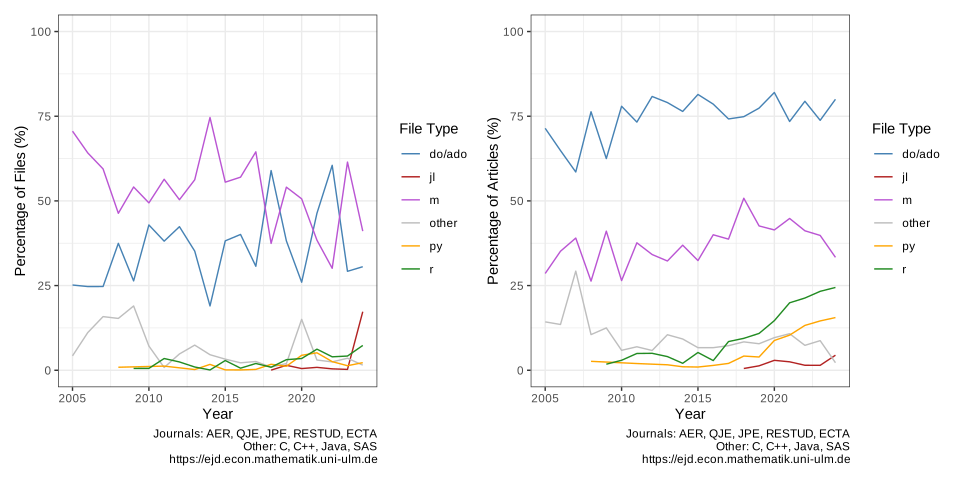
Data from Economics and R Blog of Sebastian Kranz.
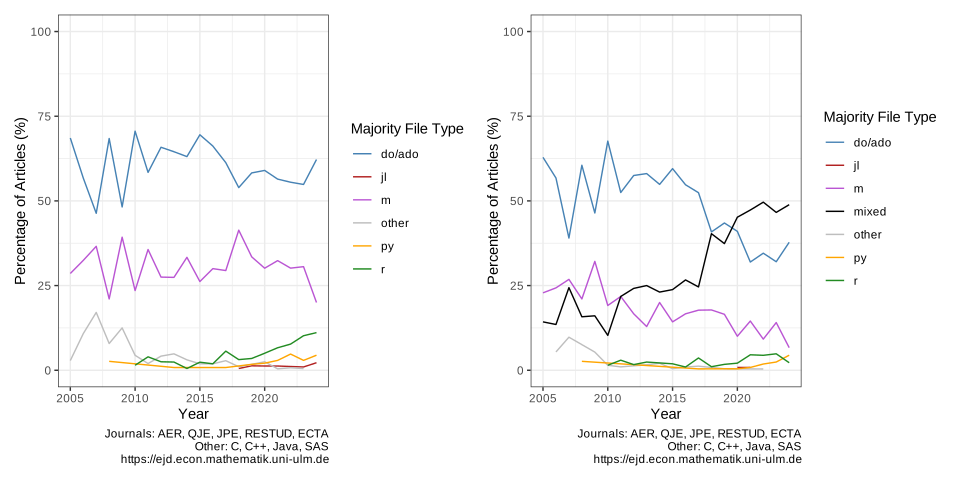
Majority Programming File Types
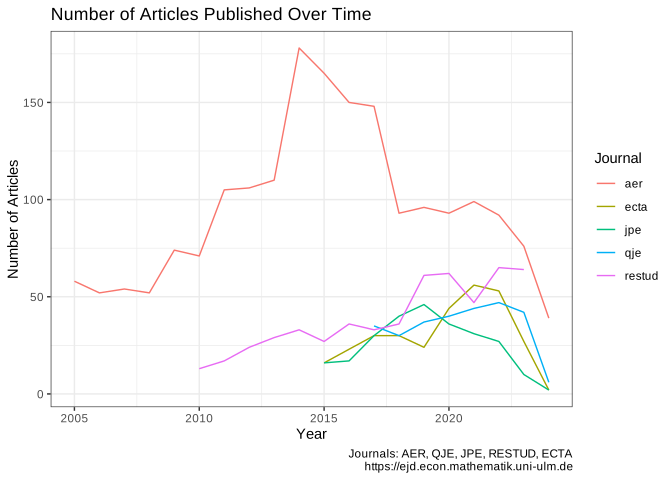
Counts of Journal Articles
- Count of articles in recent years (2024, 2025) very low
- Ignoring a lot of other file types, (“.csv”, “.xlsx”, “.dta”, etc.)
R Basics
Arithmetic
Arithmetic
Order of operations as expected
Logic
Booleans are objects that are either TRUE or FALSE
They are very useful.
Logic
- “And” operator
& - “Or” operator
|
Logic
Value Matching %in%
Compares if object on left is “in” the object on the right1
Logic
Computers handle decimals in odd ways!
? ? ?
Because computers use binary, cannot represent 0.1 exactly
Same as we cannot represent 1/3 in base 10 exactly
Assignment
In R, we use a special “arrow” operator for assignment: <-
Why not use =?
Technically you can in R, but <- is preferred becauase = is used to assign values for a function call.
Sequences
We have seen the “sequence” operator :
Which it turns out is just a shortcut for seq()
Help!
How do we know all of the options for a function?
Documentation!
This documentation is also hosted online.
Comment Malpractice: All cap notes
Never use the following:
All of this is important information!
But it shouldn’t be stored as a comment.
Instead we should use a task manager, variables declared at the top of a script, git for version control, etc.
Comment Malpractice: Duplicating the Code
You may be tempted to add this sort of comment
But what happens when you decide to change your code?
If someone else reads your code, do they trust
- the comment, or the code?
Code forces you to do exactly what you say (i.e. square, not cube). But comments do not, so they tend to get out of sync with the code.
Commenting Best Practices
Goal: “Good code does not need comments”
But that’s probably unrealisitc for most of us.
Some good rules:
- Comments should not duplicate code
- Good comments do not excuse unclear code
- Comments should dispel confusion, not cause it
These and more from: Best Practices for Writing Code Comments
My commenting practice
I like to use comments to give sections to my code
I find this useful as a way to structure my code and make it more readable later on.
Data Types
Data Types in R
Character
Logical (“boolean”)
Integer
Numeric
Complex (imaginary numbers)
Raw (bytes)
Character type
Characters (a.k.a. “strings”) store text information
Logical type
We saw logical types before. Stored as TRUE or FALSE.
Integer type
All whole numbers (no decimal): (…, -2, -1, 0, 1, 2, …)
An exact number storage, compared to the approximate “numeric” type.
To create an integer value, add an L at the end of the number
Can be useful for setting ID values,
but usually we will store numbers as “numeric” type instead.
Numeric
Numeric is a class that stores numbers as floating point values.
- think of this as a very long decimal, but not infinite
In R, “double” is the only numeric type. Equivalent to “float64” in other languages.
There used to be a “single” precision. Equivalent to “float32”.
Converting from one type to another
R has a full set of as.___() functions for each type.
[1] "12"[1] 12[1] 0cAutomatic Conversions
Some languages are very strict about data types, R is not. This is convenient, but somewhat dangerous.
R will try to convert other types to a string to paste.
Data Structures
Data Structures
- vector
- matrix / array
- list
- data.frame
- factor
Vectors
Vectors are an ordered set of values all of the same type.
They are created with the c() function (short for “concatenate”).
Vectors
Vectors all have lengths.
Vectors can have names for each element.
Accessing Vector Elements
Vector elements can be accessed by their position, or name, using square brackets[].
Applying Functions to Vectors
A lot of fuctions are “vectorized” to apply to each element.
Matrices and Arrays
Vectors are only one dimensional.
Lists
What if I need to store a mix of data types?
- Use a list!
Each element has preserved its type!
Accessing Lists
We can again access list elements by their index position.
Note: x[3] returns a list with one element
Named lists
Lists can also have names for each element. We can assign them using names() or at construction.
Lists of vectors
We saw earlier that 1 element objects are actually vectors.
This means that we can have lists of multiple element vectors.
Lists of lists
We can also have lists of lists!
$l1
$l1[[1]]
[1] 5 6 7

$l1[[2]]
[1] "A" "D" "E"


$l2
$l2[[1]]
[1] 1 2 3 4 5

$l2[[2]]
[1] TRUE
This can be as many list layers deep as you want.
Lists vs. vectors
Lists are much more general than vectors.
So why use vectors?
- Vectors, by enforcing a single type, are much more efficient.
Data.frames
Think of them as “tables” of elements.
Behind the scenes, they are a
- list of vectors,
- where each vector has the same length.
Accessing data.frame elements
Data.frame values can be accesesd using index values:
x[row, col]
What is your data structure?
The function str() will return information about the data structure of the passed object.
Factors
A specific type of vector.
Details to be covered in the problem set!
Class Activity
Class Activity
Given these two vectors:
Tasks:
Create a data.frame called
economieswith columnscountryandgdpAccess the GDP of Germany (row 3)
Create
high_gdp_countries, a boolean vector showing which countries have GDP > 5 trillion?Pass
high_gdp_countriesto the row index ofeconomies
Controlling Program Flow
If Statements
If statements evaluate a condition,
and then execute code if the condition is TRUE.
Nothing is printed. Because print() was never run.
Mulitple if statements
Sometimes you want to check a series of conditions,
[1] "X is a character."This code,
- Checks if ‘x’ is a number, then
- Checks if ‘x’ is a character.
Catching everything else
To catch any cases that do not pass any condition, you can use
[1] "I'm not sure what X is."
 logi NA
If (and if-else) statements are the basics of controlling the flow of your program.
You can make sections of code that only execute for one dataset, or a robustness check that runs on only one model.
Loops
Loops are another key component for controlling your program flow.
Two basic loops are:
for(){}while(){}
For Loops
For loops execute code for a defined number of times.
While Loops
While loops execute code repeatedly until a condition is met.
Here we emulated the function of the for loop from before.
Dangerous While Loops
It is easy to write a while loop that will run forever.
This one is inane, but you can inadevertantly construct them.
Why use While Loops?
While loops let you execute code for an unspecified duration.
Setting Safety Valves
If you are going to use a while loop, it’s a good idea to set a “safety” option to limit the maximum number of iterations.
Apply Functions
There are some disadvantages to loops,
- They tend to be inefficient
- The sometimes go on forever
One alternative is to use one of the family of apply() functions.
lapply()
We will see how to use the l + apply() function.
lstands for “list”, which is what the function returns.
lapply()
One nice thing about lapply() is it returns the values as list.
Why are Apply Functions More Efficient?
Apply functions assume that each of your elements can be operated on separately.
For loops operate on each element sequentially.
- This makes it much faster for computers to handle apply functions.
- We will see how to parrallelize apply functions later
- But sometimes you will have operations that depend on prior steps, and you will have to use for loops.
Summary
Summary
- Introduced to R
- “Calculator” operations and logic
- Assigning values
- Different data types (logical, character, numeric, etc.)
- Different data structures (vectors, lists, data.frames, etc.)
- Control Flow
- If Else
- Loops
lapply()
Live Coding Example
- Comparing a for loop to
lapply()- Sum each vector in a list of vectors
Comments
Commenting code can be useful to yourself and others.
In R, commments are any line that begins with
#In VS Code
⌘k⌘c⌘k⌘u