Hello Class!Julia
Introduction to Julia
Matthew DeHaven
February 9, 2026
Overview
- Similar to R and Python in syntax
- Very fast
- Builtin package and environment manager
- Unicode support
- Broadcasting and multiple dispatch
- Strings, dictionaries, and control flow
Julia
Julia Background
Extremely new language.
Development began in 2009. Version 1.0 was launched in 2018.
Developed by a group at MIT: “Why We Created Julia”
Designed to be:
- As readable as R and Python
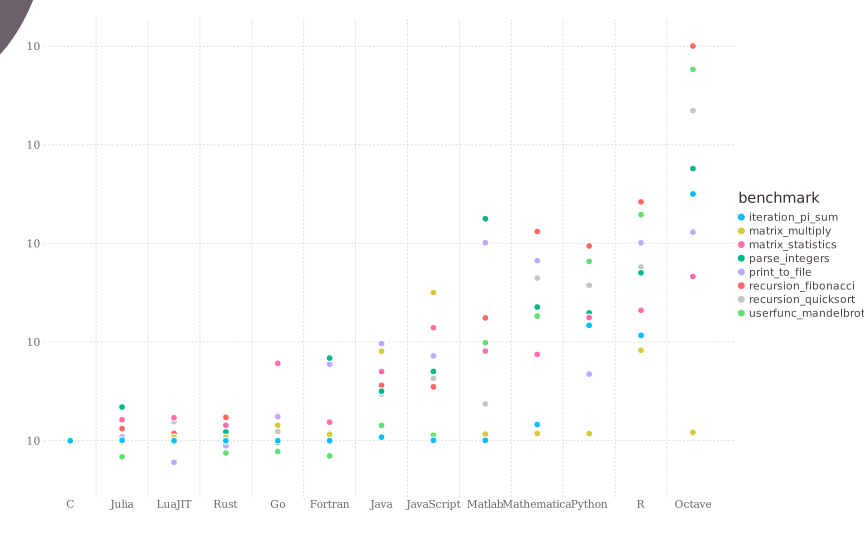
- As fast as C
(C is very fast, but hard to read and write)
Julia Microbenchmarks
Running Julia in VS Code
You can run a whole file of Julia code by clicking the play arrow.
Or you can run a single line or selection…
- hitting
Shift+Enter
Both of these will execute the Julia code in a terminal, called a REPL
- REPL = read–eval–print–loop.
Hello World Example
Julia Basics
Variable Assignment
Julia uses a single = for assignment
Basic Math
Math is not that different:
Logic
Logic operators are written with double && or ||
Julia uses lowercase true and false for booleans, unlike R’s TRUE and FALSE.
Julia Data Types
- Booleans
- Numbers: Integer, Floating
- Strings
- Collections:
- Arrays, Tuples, Dicts
Making Arrays
A basic array is constructed as comma-separated elements in square brackets
Single dimension arrays are referred to as Vectors.
Array Types
Arrays will default to the most general type at construction.
If even one of the elements is a float at construction:
Array Types are Immutable
We cannot add a float to an already made Int Array:
InexactError: Int64(9.1)
Stacktrace:
 [1] Int64
   @ ./float.jl:923 [inlined]
 [2] convert
   @ ./number.jl:7 [inlined]
 [3] setindex!(A::Vector{Int64}, x::Float64, i::Int64)
   @ Base ./array.jl:985
 [4] top-level scope
   @ ~/GitHub/Teaching/BrownEcon2020/course-applied-economics-analysis-2026-Spring/lecture-slides/julia.qmd:216
Arrays of Any Type
But at construction, arrays can include any types:
Julia will default to a general type “Any” to allow an integer, float, string, and boolean to exist in the same array.
Enforcing an Array Type
You can be explicit about the type for an array by listing it before the square brackets.
Empty Arrays
This is most useful when creating an empty array—which defaults to type Any.
Empty array with a type:
Array Dimensions
You can make…
- arrays of multiple dimensions (2d: matrices, Nd).
Tuples
Tuples are constructed as comma-separated elements in parentheses.
Tuples are immutable; arrays are mutable.
- i.e. you cannot change values of tuples once created, or add additional elements
MethodError: no method matching setindex!(::Tuple{Int64, String, Float64, Bool}, ::Int64, ::Int64)
The function `setindex!` exists, but no method is defined for this combination of argument types.
Stacktrace:
 [1] top-level scope
   @ ~/GitHub/Teaching/BrownEcon2020/course-applied-economics-analysis-2026-Spring/lecture-slides/julia.qmd:293
Strings
Strings in Julia use double quotes (single quotes are for characters):
String Interpolation
Julia can insert variables directly into strings with $:
Compare to R’s paste() or paste0().
Julia’s $ interpolation is much more concise: "Hello $name" vs paste0("Hello ", name).
Dictionaries
Dictionaries store key-value pairs (similar to named lists in R):
Dict{String, Int64} with 3 entries:
  "c" => 3
  "b" => 2
"a" => 1Julia Indexing and Subsetting
Julia starts indexing from 1.
We can subset arrays with square brackets:
For Loops
Julia is not space sensitive.
A for loop instead ends with an end keyword
While Loops
Julia also has while loops:
Just like for loops, while loops are closed with end.
If Statements
Julia uses if, elseif, and else — all closed with end:
Compare to R which uses if (...) { } else if (...) { } else { }.
Julia uses elseif (one word, no space) and end instead of braces.
Ternary Operator
For simple if/else, Julia has a one-line shortcut:
This is equivalent to:
Julia Functions
Julia functions are defined with the keyword function and end:
Short Function Declaration
For one line functions, you can define them with:
Multiple Dispatch
Julia’s key design feature: you can define the same function for different input types.
describe (generic function with 3 methods)Why Multiple Dispatch Matters
Julia picks the right version of a function based on all argument types.
This is how Julia stays fast: the compiler generates optimized code for each type combination.
Fun Feature: Unicode Support
Julia has built in unicode support.
Unicode is a text encoding standard that supports characters from all major writing systems and emojis!
Practical Unicode
Actual use: greek letters for equations
Tidier than writing out “beta” and “gamma”,
Writing out Unicode
In VS Code, to get one of these unicode symbols, you type:
\:smiley: for 😃
Once you start typing \:smi… you can use tab to autocomplete.
Similarily,
\beta for β
For a full list, see the Unicode Julia documentation.
Vectorization in Julia
Julia can vectorize (broadcast) any function, which is incredibly useful.
- By default, Julia functions aren’t vectorized:
MethodError: no method matching abs(::Vector{Int64})
The function `abs` exists, but no method is defined for this combination of argument types.

Closest candidates are:
  abs(::Bool)
   @ Base bool.jl:155
  abs(::Pkg.Resolve.VersionWeight)
   @ Pkg ~/.julia/juliaup/julia-1.12.4+0.aarch64.apple.darwin14/share/julia/stdlib/v1.12/Pkg/src/Resolve/versionweights.jl:32
  abs(::Missing)
   @ Base missing.jl:101
  ...

Stacktrace:
 [1] top-level scope
   @ ~/GitHub/Teaching/BrownEcon2020/course-applied-economics-analysis-2026-Spring/lecture-slides/julia.qmd:609
Vectorization in Julia
Julia can vectorize (broadcast) any function, which is incredibly useful.
- By default, Julia functions aren’t vectorized:
- To apply the
absfunction to each element, add the.operator:
Broadcasting Your Own Functions
Broadcasting with the . operator works for any functions:
Broadcasting with Math Operators
By default, Julia won’t multiply two vectors element by element:
MethodError: no method matching *(::Vector{Int64}, ::Vector{Int64})
The function `*` exists, but no method is defined for this combination of argument types.

Closest candidates are:
  *(::Any, ::Any, ::Any, ::Any...)
   @ Base operators.jl:642
  *(::LinearAlgebra.AbstractQ, ::AbstractVector)
   @ LinearAlgebra ~/.julia/juliaup/julia-1.12.4+0.aarch64.apple.darwin14/share/julia/stdlib/v1.12/LinearAlgebra/src/abstractq.jl:180
  *(::Dates.Period, ::AbstractArray)
   @ Dates ~/.julia/juliaup/julia-1.12.4+0.aarch64.apple.darwin14/share/julia/stdlib/v1.12/Dates/src/periods.jl:93
  ...

Stacktrace:
 [1] top-level scope
   @ ~/GitHub/Teaching/BrownEcon2020/course-applied-economics-analysis-2026-Spring/lecture-slides/julia.qmd:650
Broadcasting with Math Operators
By default, Julia won’t multiply two vectors element by element:
Instead, use broadcasting to get this behavior
The Pipe Operator
Julia has a pipe operator |>, just like R’s |> or %>%:
Class Activity
Class Activity
Open a Julia REPL in VS Code and try the following:
Create an array of the integers 1 through 20.
Write a function
is_even(x)that returnstrueifxis even andfalseotherwise.- Hint: the remainder operator is
%.
- Hint: the remainder operator is
Broadcast your function over the array to get a vector of
true/false.Use string interpolation to print:
"There are __ even numbers in my array."- Hint: you can
sum()a boolean vector.
- Hint: you can
Julia Environments and Packages
Pkg.jl
Julia has a built in package and environment manager: Pkg.jl
It has its own REPL, which can be launched from Julia by typing a right square bracket: ]
But all of its commands can also be run from withing Julia.
- ex:
Pkg.add("DataFrames")
I will show commands should be run in the Pkg REPL with: pkg>
Creating an Environment
- In a Julia REPL, activate the Pkg REPL with:
]
Then you can create and activate an environment:
This will create an environment in a new folder, “myenv”.
Adding a Package
In Julia, you can install packages both system wide
- i.e. in the default installation environment (called something like “v1.10”)
or in an environment you have created.
Pkg TOMLs
Once you have a package added to your environment, you will see two files:
Project.toml: Lists the packages you have installed for this environment
Manifest.toml: Lists the Julia version, installed package versions, package dependency versions
With these two files, Julia can always recreate your environment.
Connect Environment to VS Code Workspace
In order to have your VS Code workspace automatically use the correct Julia environment, you have to connect it.
- Open the Command Palette (
Shift+Cmd+P), then search “Julia: Change Current Environment”
- Click on “Julia env:” at the bottom left of the VS Code window
After selecting your environment, VS Code will add a “.vscode/settings.json” file to the folder. This file contains a path to the environment.
Using Packages
Once you have a package installed, you can:
- Load the entire namespace:
- Import the package and use the
.to reference functions
DataFrames
Working with Data
DataFrames is a package that implements dataframes in Julia.
First, you need to install DataFrames, then import it.
And then in your Julia code:
DataFrame Example
Constructing a dataframe by hand:
Accessing Columns
You can access a column by name with . or [:, :col]:
df.a is shorthand. df[:, :a] returns a copy; df[!, :a] returns the column without copying.
Filtering Rows
Filter rows using boolean conditions:
Filtering on Multiple Rows
Combine conditions with .&& (broadcasted AND):
Notice the .> and .== — these are broadcasted comparisons, just like we saw earlier.
The “Bang!” Convention
In Julia, functions that modify their inputs always end with a bang: !
Mutating vs. Non-Mutating
Compare sort (returns a new array) vs. sort! (modifies in place):
Original: [3, 1, 2]
Sorted copy: [1, 2, 3]Whenever you see a ! at the end of a function name, it is warning you: “this will change your data in place!”
Data Science with DataFrames
Usual data science operations are possible with Julia and DataFrames.jl
- group by
- summarize
- adding new columns
- etc.
For reading and writing CSVs, use the CSV.jl package.
Plotting in Julia
Lots of possible plotting packages in Julia.
Plots.jlthe most usedGadfly.jlis a grammar of graphics packageUnicodePLots.jlmakes plots in the terminalMakie.jlis a high performance plotting package (can use GPUs for big plots)AlgebraOfGraphics.jlis a grammar of graphics package that wrapsMakie.jlPlotlyJS.jlis a wrapper for Plotly
Plot Example with PLots.jl

Just-in-time Compilation
Programming languages have to be compiled to machine code before they can be run.
Julia does this “just-in-time” (JIT)—i.e. right before the code is run.
This means that Julia can be very fast, but it also means that the first time you run a function, it will be slow.
The speed advantage comes from compiling code for only the specific types of the inputs.
An example of the disadvantage is the “time to first plot” problem.
- the first plot you run in a Julia session takes a while, the second is fast
Summary
Lecture Summary
- Similar to R and Python in syntax
- Very fast
- Builtin package and environment manager
- Unicode support
- Broadcasting and multiple dispatch
- Strings, dictionaries, and control flow
- Pipe operator
|> - Mutating
!convention - JIT compilation
Live Coding Example
- Launch Julia REPL
- Create a new environment
] activate . - Install
GadflyandRDatasets
- attach Julia environment to VS Code workspace